Colors and Palettes
The Colors and Palettes panel is in the sidebar (N) > Pixel Art Studio tab, right under the main Pixel Art Studio panel, in the 3D Viewport and in the Image Editor (open by default). The tools popup (D) has it too, without the color picker.
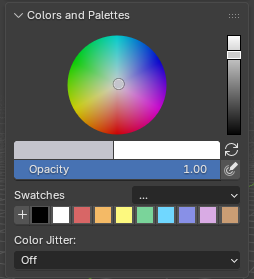
From top to bottom:
The color picker (for the primary color).
The primary and the secondary colors, and the swap button.
Opacity(see Settings shared by the paint tools).The swatches and the
...palette menu.Color Jitter(see Color Jitter).
The hex you pick is exactly the hex that is painted, byte for byte: in the color picker, in the swatches, from a Lospec palette and in the texture. No color management surprises.
Color picker
Blender’s own color picker, embedded in the panel, on the primary color.
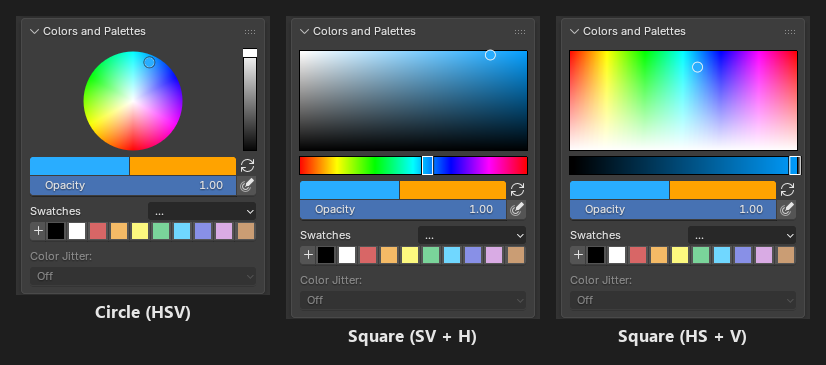
Its shape follows Blender’s
Preferences > Interface > Editors > Color Picker Type(Circle (HSV),Square (SV + H)and so on).Show color pickerin the add-on preferences (General>Colors and Palettes) hides it, the two colors and the swatches stay.
Primary and secondary colors
Primary color (left, black by default): what the tools paint with.
Secondary color (right, white by default): the gaps of a fill pattern, the
Secondary Colorfill of the Rectangle, the Ellipse and the Path, and the end color of the Gradient.Click either color for Blender’s popup picker, with the
Hexfield and the alpha (a color with alpha below 1 paints that transparent).Swap: the refresh icon right of the two colors, or Alt+X while a tool is armed (X in
Pixel Art Studio Only).
Swatches
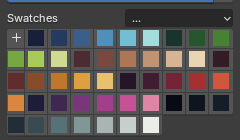
+adds the primary color as a swatch.Click a swatch to paint with it (the swatch of the current color is drawn pressed).
Ctrl+click a swatch removes it (right click >
Remove Swatchtoo).Next Swatch(Alt+X inPixel Art Studio Only, while a tool is armed) walks your swatches: the primary color becomes the next swatch, wrapping around at the end.The swatch you last clicked is where the
Swatchesramp ofColor Jitterand theColor Replaceramp of the Shading tool start.The swatches are saved in the .blend (per scene). A new file starts with a palette of ten colors.
Palettes
The ... button beside Swatches opens the palette menu:
Lospec palettes...: the Lospec palette library (below).Import Palette Image…: reads the colors out of an image (.png,.jpg,.bmpor.tga). Every unique color becomes a swatch, in the order they appear (top row first, left to right), up to 256 colors. Fully transparent pixels are skipped.Save Palette: saves the current swatches as a Blender palette inside the .blend (saving with an existing name overwrites it). It’s a regular Blender palette, so Blender’s own paint tools can use it too.Load Palette: loads any Blender palette of this file into the swatches.Clear Swatches: removes every swatch.
Importing, loading and Lospec palettes replace the swatches you have.
Tip
Use a clean palette image for Import Palette Image…, like the PNG palettes you can download from Lospec. A photo or a JPG gives you hundreds of near duplicate colors.
Warning
Swatches and palettes are not part of the undo history, Ctrl+Z won’t bring back a cleared or replaced palette. Use Save Palette before experimenting.
Lospec palette library
500 palettes from Lospec ship with the add-on (they open instantly and work offline), in Lospec’s own ranking order: Resurrect 64, Endesga 32, Apollo, Lospec500 and so on, including classics like PICO-8, Sweetie 16, DawnBringer 16 and Nintendo Gameboy (bgb).
Open
...>Lospec palettes....Optionally filter by the number of colors:
Any,Max,MinorExact, and the number beside it.Click a palette (its name or any of its colors): it loads onto the swatches at once, so you see it applied to your model while you browse.
Closekeeps the palette you clicked last,Cancelputs back the swatches you had before.
To find a palette by name, click the small arrow under the list (Blender’s list filter) and type part of its name,
PICOfor example. It searches the names only, not the authors.See more in Lospecopens the Lospec palette list in your web browser.
Note
On Blender 3.6 and 4.0 the browser is Blender’s plain dialog: narrower, with an OK button instead of Close and Cancel. OK keeps the palette, and Esc puts back the swatches you had before.